Order Tracking
Use the Order Tracking feature to search for orders using reference numbers from different systems, such as warehouse outbound numbers, shipment IDs, or carrier tracking numbers. This is useful when you need to locate an order but only have a reference from a connected system.
Prerequisites
To search for an order, you must have one of the following reference numbers:
- Sales Order Tracking: Sales Order (SO) number generated in OMS.
- Outbound Order Tracking: Outbound Order number, equal to the DN number in WMS.
- Package Tracking: Shipment number (SP) generated in OMS.
- Logistics Tracking: Tracking Number or Master Tracking Number provided by carrier.
Track Orders
- Navigate to Sales Orders > Order Track.
- Choose one of the four Core Features based on the number you have:
- Order Information: Search by Sales Order (SO) number to track the complete order lifecycle.
- Outbound Tracking: Search by WMS Outbound Order (DN) number to monitor warehouse tasks like picking and packing.
- Package Information: Search by Shipment Number to view specific package details and milestones.
- Logistics Tracking: Search by Tracking Number or Master Tracking Number to visualize delivery routes and ETAs.
- Enter the number and click Search.
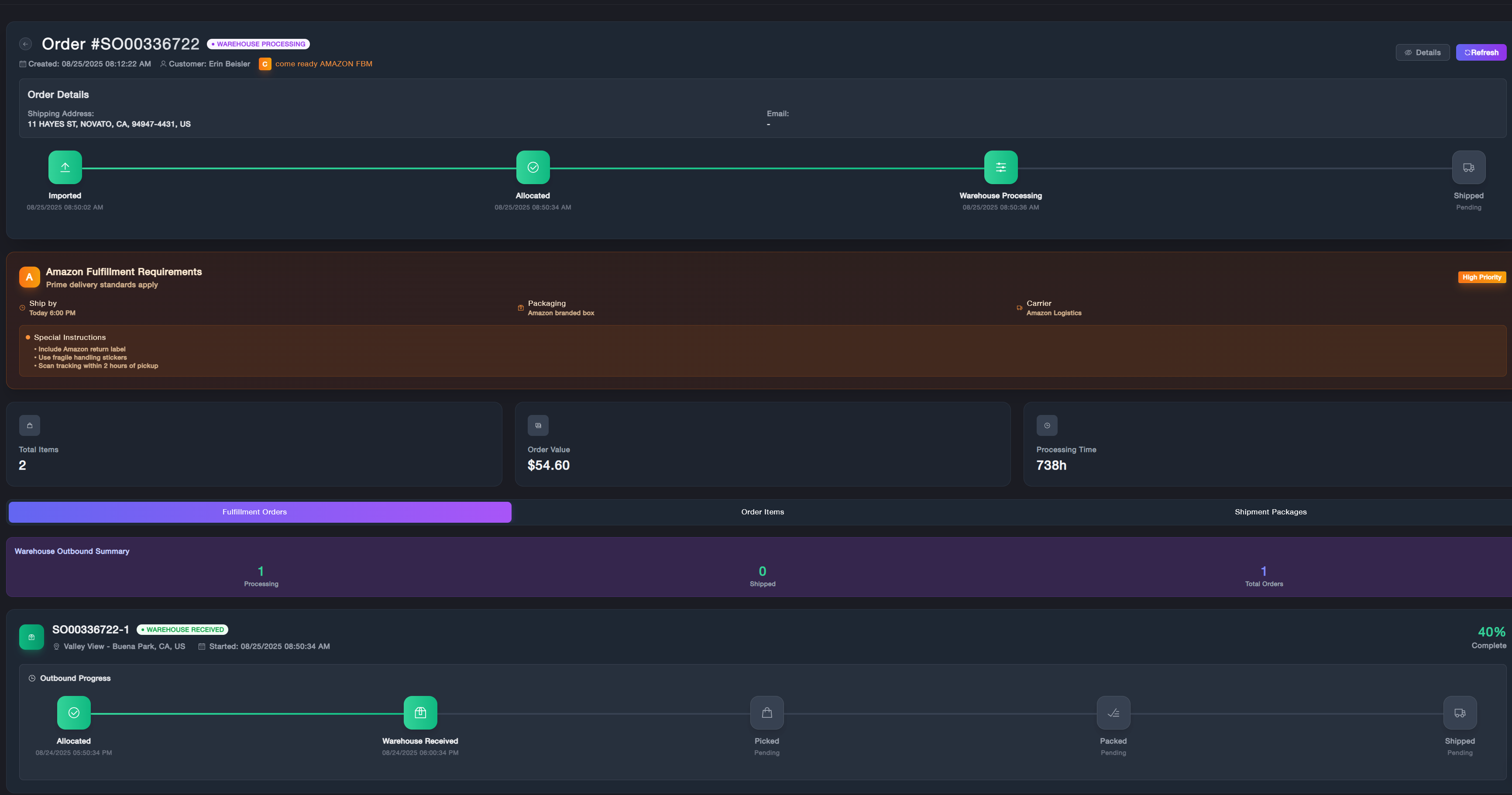
- You can see a unified view of the fulfillment cycle:
- Order Header: Displays the unique Order ID (SO number), current fulfillment status, and the integrated Sales Channel.
- Performance Cards: Provides a quick overview of the total items in the order, the total order value, and the total processing time elapsed.
- Order Progress Timeline: A high-level visual journey tracking the order through major system milestones: Imported, Allocated, Warehouse Processing, and Shipped.
- Warehouse Outbound Summary: Displays the real-time status of the physical package within the facility, including Processing and Shipped counts.
- Detailed Outbound Progress: A timeline with specific date and time stamps for warehouse-level actions such as Warehouse Received, Committed, Picked, and Shipped. Alongside Order Items, and Shipment Packages detailed info.