WMS Inventory
The Inventory List provides real-time tracking, stock adjustments, and accurate visibility across all connected warehouses. It serves as a centralized dashboard to monitor what is sellable, what is damaged, and where your stock is located.
Prerequisites
To ensure your inventory appears correctly:
- Item Setup: The SKU must be created in the Product > Item Master section.
- Facility Mapping: The Facility must be correctly mapped in CRM.
- WMS Entry: Initial stock levels must be recorded in the source WMS (V2 or V3).
Search Inventory Records
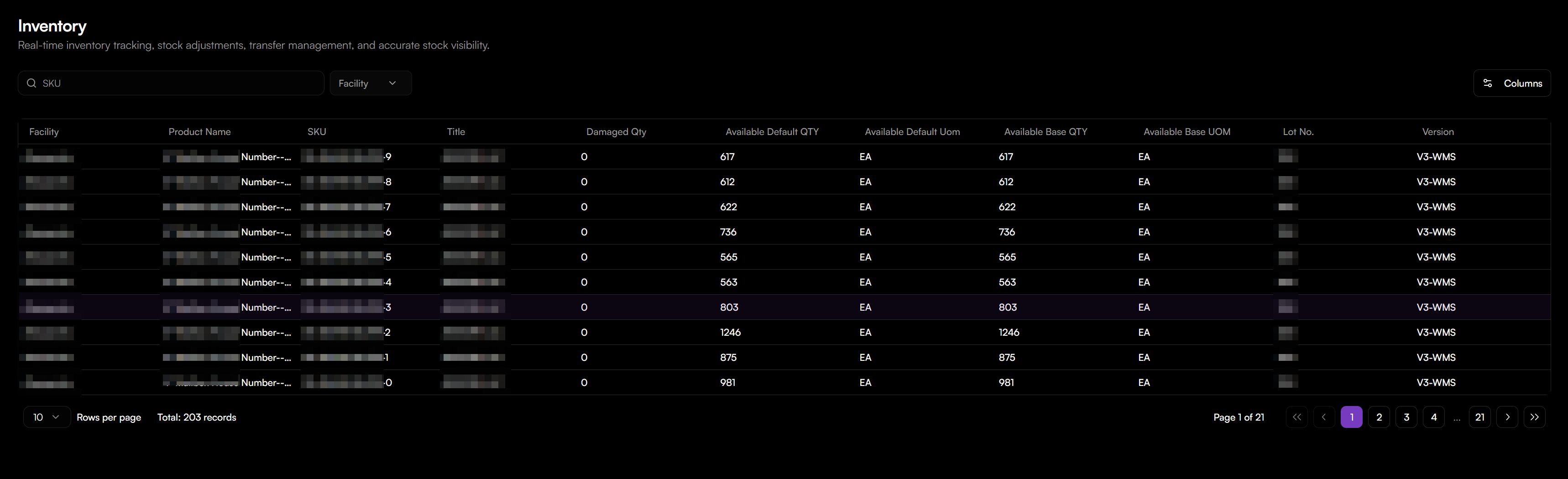
To locate specific inventory records:
- Navigate to the Inventory tab in the top navigation menu.
- Enter a specific product identifier in the search bar to Search by SKU.
- You can also use the Facility dropdown menu to narrow results to a specific warehouse location.
- Click the Columns button to select which data fields are visible in your table.
Inventory Fields
The table below describes the data points visible in your inventory records:
| Field | Description |
|---|---|
| Facility | The specific warehouse or storage location (e.g., Joliet, Valley View). |
| Product Name / Title | The descriptive name or internal title assigned to the item. |
| SKU | The unique Stock Keeping Unit identifier. |
| Damaged Qty | Stock marked as unsellable due to damage or quality issues. |
| Available Default QTY | The current sellable quantity available in your primary unit of measure. |
| Available Default UOM | The standard unit for the default quantity (e.g., EA for Each). |
| Available Base QTY | The sellable quantity expressed in the base unit used for system tracking. |
| Available Base UOM | The unit of measure for the base quantity. |
| Lot No. | The specific batch or lot number for tracking expiry or production runs. |
| Version | The source WMS system managing the stock (e.g., V3-WMS or V2-WISE). |
Understanding Your Data
- Real-Time Accuracy: Data is synchronized directly from your Warehouse Management Systems (WMS). Any changes made in the warehouse are automatically reflected here.
- Multiple Listings: You may see the same SKU listed multiple times if it is stored in different facilities or managed under different WMS versions.