Container Tracking
Container Tracking provides end-to-end visibility for cross-border sea-freight shipments. Track container locations, view shipment timelines, monitor cargo manifests, and access stakeholder information—all from a single interface within OMS. Use this feature when:
- You have received container or bill of lading information from your freight forwarder
- You need to monitor the ocean‑freight progress of a specific shipment
- You want to view the detailed cargo manifest and shipping timeline for customs
Prerequisites
To search for a container, you must have one of the following reference numbers provided by your logistics provider:
- Container Number: The unique alphanumeric code on the shipping container.
- Master Bill of Lading (MBL): The primary contract issued by the ocean carrier.
- House Bill of Lading (HBL): The document issued by the freight forwarder.
- Purchase Order (PO#): The original purchase order number associated with the cargo.
Note: This feature pulls data from your integrated logistics systems. If you cannot find expected container information, confirm with your freight forwarder that the shipment details have been properly transmitted to OMS.
Tracking the Container Info
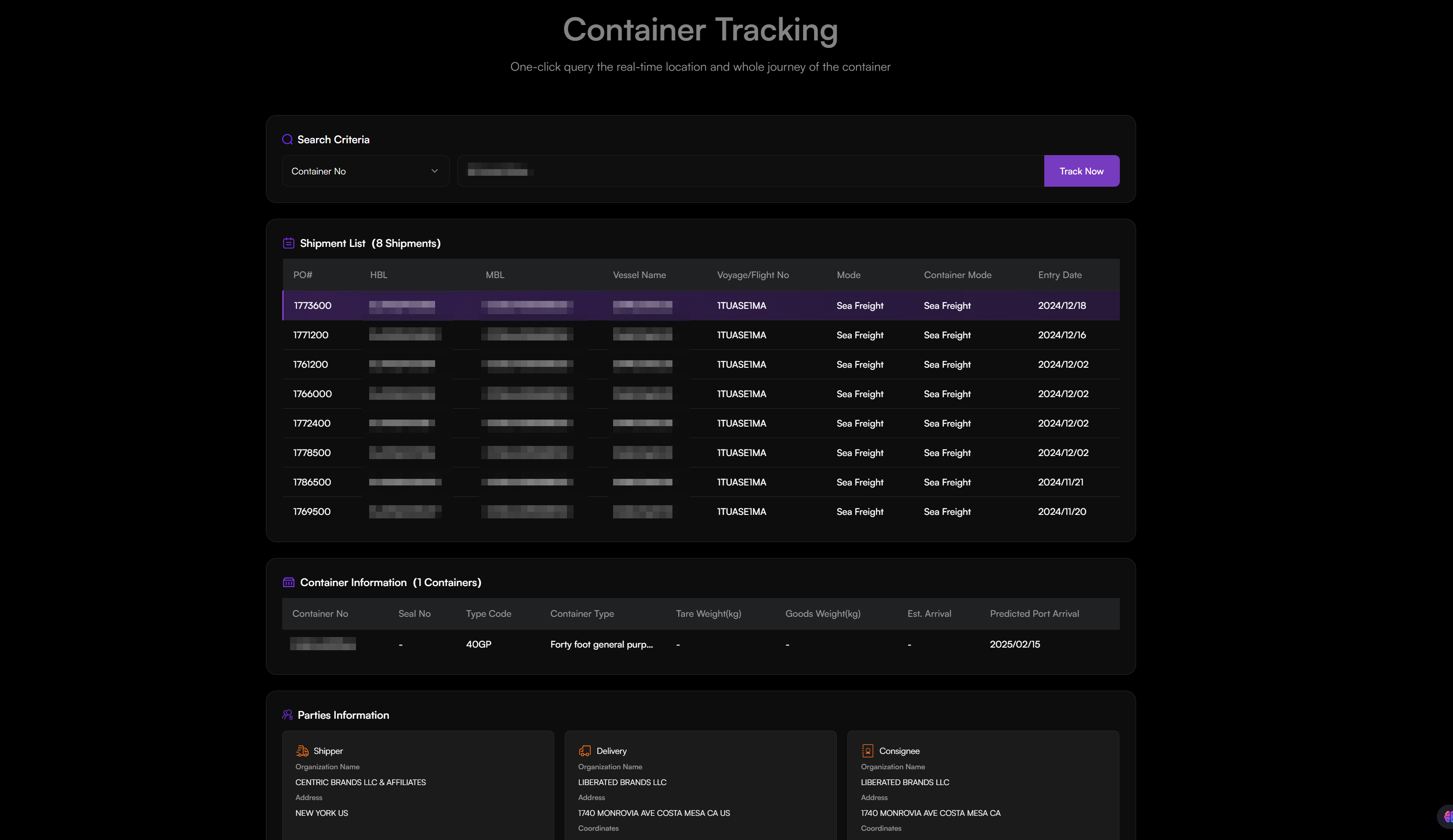
- Navigate to Purchase Order > Container Tracking.
- Enter one of the following identifiers:
- Container Number
- Master Bill of Lading (MBL)
- House Bill of Lading (HBL)
- Purchase Order Number (PO#)
- Click Track Now.
- Once a search is successful, the dashboard organizes shipment data into the following sections:
- Shipment List: A high-level table showing all shipments associated with the ID, including the Vessel Name, Voyage/Flight Number, and the system Entry Date.
- Container Information: Technical details of the physical unit, including Seal Number, Container Type, Tare/Goods Weight, and Estimated Arrival dates.
- Parties Information: Contact cards for the Shipper (sender) and the Consignee (receiver), including organization names and addresses.
- Cargo Manifest: An itemized inventory of every product inside the container, listing Product IDs, Descriptions, Quantities, and Total Values.
- Shipment Timeline: A vertical milestone log tracking the journey, such as Departure from First Load Port and Arrival at Final Discharge Port, labeled with Planned and Actual dates.