Shipping Requests
A Shipping Request is a record that represents a shipment execution request sent from OMS to a warehouse for order fulfillment. It acts as the primary document for tracking the physical movement of goods, from the moment a warehouse receives the order to final delivery.
Each Shipping Request corresponds to a specific Warehouse Shipment and tracks the full execution lifecycle. Because order fulfillment can be complex, a Shipping Request may originate from a single sales order or multiple merged sales orders.
Shipping Request Process Flowchart
Shipping Requests are automatically generated by the system and do not require manual creation. The process follows these stages:
- Order Routing: A Sales Order is routed to a specific warehouse location.
- DN Creation: The system generates a Delivery Notice (DN), the outbound order sent to the WMS.
- Request Generation: The Shipping Request record is created to provide shipment-level visibility within the OMS.
Understanding the Shipping Request Record
The Shipping Request page displays key identification and tracking data. Understanding these fields is essential for monitoring fulfillment progress.
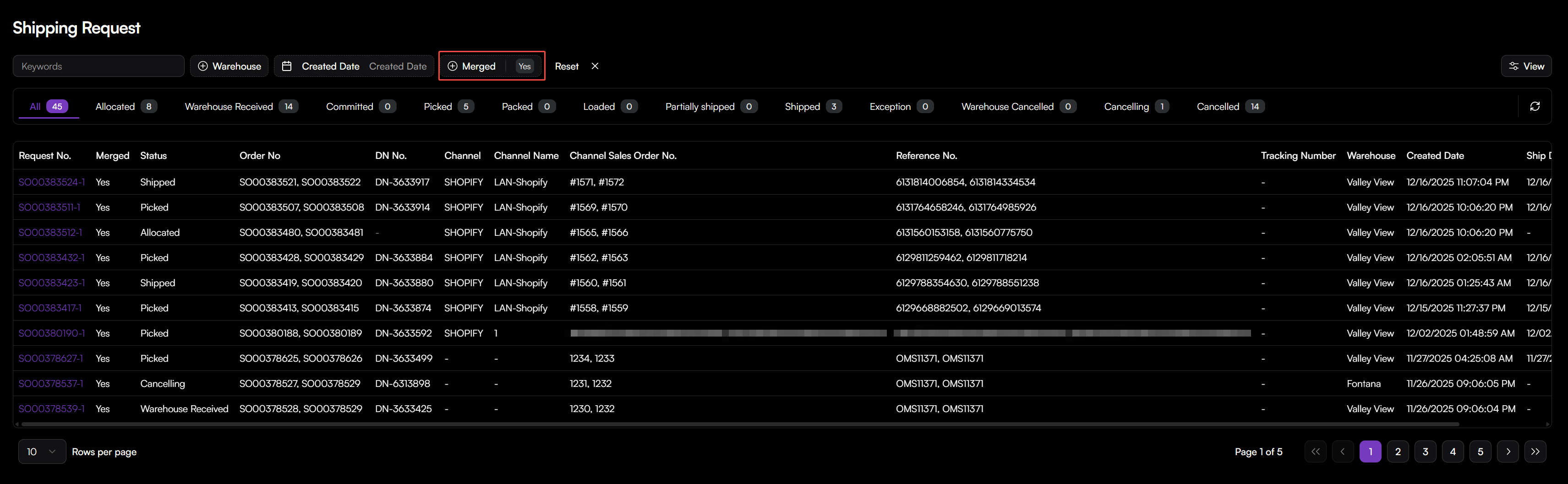
- Request No.: The unique identifier for the shipment request.
- Order No.: The internal OMS Sales Order number associated with the shipment.
- DN No.: The Delivery Notice number. This is the outbound order ID used to identify the shipment within the WMS.
- Channel: The source channel of the sales order.
- Channel Name: The display connector name you specified after integrating with the third-party channel.
- Channel Sales Order No.: The original order ID provided by the sales channel (e.g., Amazon, Shopify).
- Reference No.: Secondary identification provided during order import.
- Tracking Number: The tracking number synced from WMS after shipped.
- Warehouse: The assigned warehouse for this order.
The Merged field identifies if the shipment was consolidated to improve shipping efficiency.
- Yes: The shipment was created from multiple sales orders merged into one package.
- No: The shipment was created from a single sales order.
Track Shipping Request Statuses
The status of a Shipping Request reflects the real-time execution progress reported by the warehouse. You can monitor these statuses via the status tabs at the top of the Shipping Request list.
| Status | Description |
|---|---|
| Allocated | Order assigned to specific warehouse based on routing rules, waiting for warehouse acceptance. |
| Warehouse Received | The WMS has successfully received the shipment request/DN. |
| Committed | Inventory has been reserved for the shipment. |
| Picked | Items have been physically picked from the warehouse shelves. |
| Packed | Items have been packed into containers and are ready for labeling. |
| Loaded | The shipment has been loaded onto a vehicle for transport. |
| Partially Shipped | Only a portion of the requested items have been shipped. |
| Shipped | The shipment has been fully processed and handed to the carrier. |
| Exception | An issue occurred during fulfillment that requires manual review. |
| Warehouse Cancelled | The shipment was cancelled by WMS. |
| Cancelled / Cancelling | The shipment is in the process of being voided or is fully cancelled. |
View / Filter Shipping Requests
To View Shipping Requests:
- Go to Sales Orders > Shipping Request.
- The list view provides a high-level summary of all requests, including Channel, Warehouse, Tracking Number, and Timestamps.
- Choose a specific record and click the request no. to track the full lifecycle of the request.
To Filter and Search for Shipments:
- Status Tabs: Click a specific status tab (e.g., Picked, Packed) to see all records currently in that stage.
- Warehouse Filter: Use the Warehouse dropdown to view shipments assigned to a specific facility.
- Date Filters: Use the Created Date filter to find shipments generated within a specific timeframe.
- Keyword Search: Enter a Request No., DN No., or Tracking Number in the search bar to locate a specific record.
[!NOTE] Tracking information and Ship Dates are automatically populated once the warehouse updates the status to Shipped.