YMS Webhook Integration Guide
1. Overview
YMS (Yard Management System) provides a Webhook notification service. When critical business events occur within the yard (such as vehicle check-in or check-out), the system automatically pushes notifications to your designated endpoint. Your WMS or business system can receive these event notifications in real time, enabling efficient inter-system collaboration.
2. Prerequisites
Before configuring, please confirm the following:
- You have administrator access to the YMS system
- You have prepared a publicly accessible HTTPS endpoint
- Your endpoint can handle HTTP POST requests and return a 2xx status code upon successful processing
3. Configuring Webhooks
3.1 Accessing the Configuration Page
Log in to the YMS admin console and navigate to Admin > Webhook Configuration in the left sidebar.
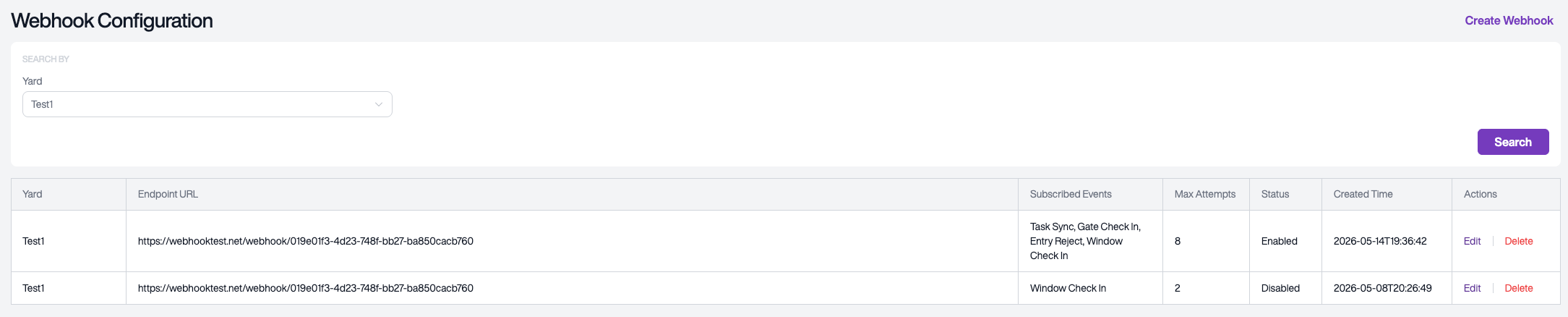
On this page, you can view all configured Webhooks, including the associated yard, endpoint URL, subscribed events, status, and other details.
3.2 Creating a Webhook
Click the Create Webhook button in the upper-right corner to open the creation page.
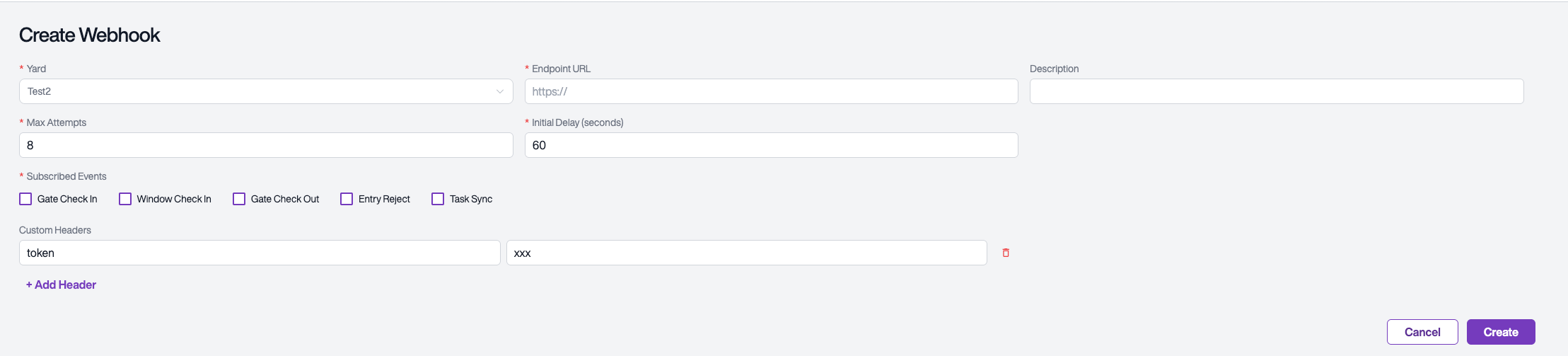
Fill in the configuration fields as described below:
3.3 Editing a Webhook
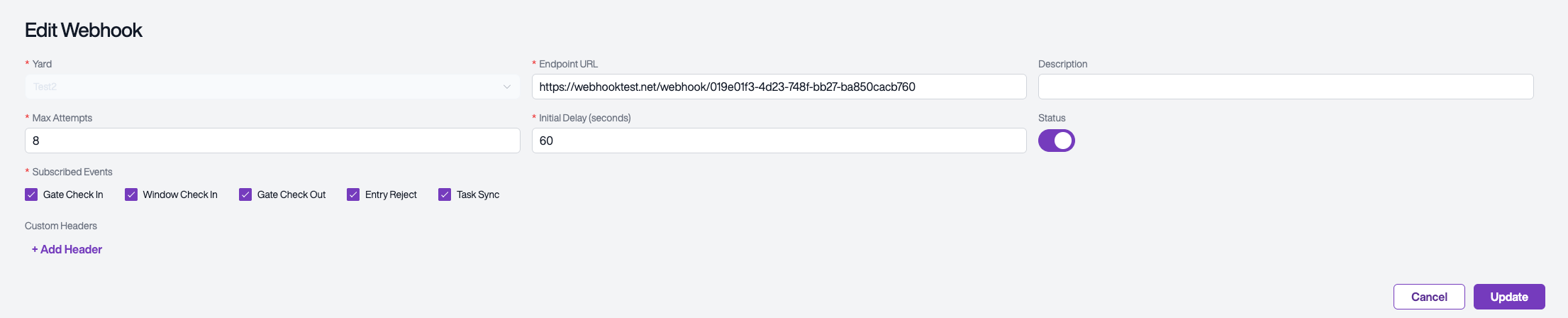
Click Edit on a list entry to open the edit page, where you can modify existing configurations. The edit page also provides a Status toggle to enable or disable the Webhook.
| Field | Required | Description |
|---|---|---|
| Yard | Yes | Select the yard to receive notifications for |
| Endpoint URL | Yes | Your receiving endpoint; must use HTTPS |
| Description | No | Configuration description for identification and management |
| Subscribed Events | Yes | Select the event types to subscribe to (multiple selection allowed) |
| Max Attempts | Yes | Maximum retry attempts on delivery failure (1-20, default 8) |
| Initial Delay Seconds | Yes | Wait time before the first retry, in seconds (10-86400, default 60) |
| Custom Headers | No | Custom request headers, can be used for authentication |
3.4 Supported Event Types
| Event Type | Trigger | Notification Method |
|---|---|---|
| GATE_CHECK_IN | Vehicle completes check-in at the gate | Asynchronous notification |
| WINDOW_CHECK_IN | Vehicle arrives at the dock and completes check-in | Asynchronous notification |
| GATE_CHECK_OUT | Vehicle completes check-out at the gate | Asynchronous notification |
| ENTRY_REJECT | Vehicle entry request is rejected | Asynchronous notification |
| TASK_SYNC | Task creation/update/cancellation sync | Synchronous call |
Note: TASK_SYNC differs from other events — it is a synchronous call. When YMS creates, updates, or cancels a task, it calls your endpoint in real time and waits for a response. Your system must return a result in the specified format; otherwise, the task operation will fail. See Section 4.5 for details.
4. Notification Format
4.1 Request Method
When an event occurs, YMS sends a JSON-formatted notification to your endpoint via HTTP POST.
Please ensure your endpoint responds within 5 seconds; a timeout will be treated as a delivery failure.
4.2 Request Headers
Each notification includes the following standard request headers:
| Header | Description |
|---|---|
Content-Type | application/json |
X-YMS-Event-Id | Unique event identifier, can be used for deduplication |
X-Tenant-Id | Tenant identifier |
X-Yard-Id | Yard identifier |
X-Event-Type | Event type (e.g., GATE_CHECK_IN) |
X-Timestamp | Notification send time |
If you configured Custom Headers in your Webhook settings, those custom headers will also be included.
4.3 Notification Payload — Check-In/Check-Out Events
Applies to GATE_CHECK_IN, WINDOW_CHECK_IN, and GATE_CHECK_OUT events:
{
  "entryId": "entry record identifier",
  "appointmentId": "appointment identifier",
  "vehicleId": "vehicle identifier",
  "checkinTime": "2024-01-15T08:30:00",
  "checkoutTime": "2024-01-15T10:00:00",
  "entryStatus": "CHECKED_IN",
  "inboundAction": "RECEIVE",
  "inboundReceiptIds": ["REC-001", "REC-002"],
  "inboundCustomerIds": ["CUST-001"],
  "inboundCustomerNames": ["Customer A"],
  "inboundTaskId": "inbound task identifier",
  "outboundAction": "LOAD",
  "outboundLoadIds": ["LOAD-001"],
  "outboundCustomerIds": ["CUST-002"],
  "outboundCustomerNames": ["Customer B"],
  "outboundTaskId": "outbound task identifier",
  "inYardAction": "MOVE",
  "carrierId": "carrier identifier",
  "carrierName": "carrier name",
  "driverId": "driver identifier",
  "driverName": "driver name",
  "driverPhone": "driver phone number",
  "driverLicense": "driver license number",
  "licensePlate": "license plate number",
  "equipmentNo": "trailer number",
  "equipmentType": "equipment type",
  "sealNo": "seal number",
  "receiptType": "REGULAR_RECEIPT",
  "dropOffLocationName": "drop-off location name",
  "dropOffLocationId": "drop-off location identifier",
  "pickUpLocationName": "pick-up location name",
  "pickUpLocationId": "pick-up location identifier"
}
Field Descriptions:
| Field | Type | Description |
|---|---|---|
| entryId | String | Unique entry record identifier |
| appointmentId | String | Associated appointment identifier |
| vehicleId | String | Vehicle identifier |
| checkinTime | String | Check-in time |
| checkoutTime | String | Check-out time |
| entryStatus | String | Current entry status (see enum values below) |
| inboundAction | String | Inbound action type (see enum values below) |
| inboundReceiptIds | Array | List of inbound receipt numbers |
| inboundCustomerIds | Array | List of inbound customer identifiers |
| inboundCustomerNames | Array | List of inbound customer names |
| inboundTaskId | String | Inbound task identifier |
| outboundAction | String | Outbound action type (see enum values below) |
| outboundLoadIds | Array | List of outbound load numbers |
| outboundCustomerIds | Array | List of outbound customer identifiers |
| outboundCustomerNames | Array | List of outbound customer names |
| outboundTaskId | String | Outbound task identifier |
| inYardAction | String | In-yard action type (see enum values below) |
| carrierId | String | Carrier identifier |
| carrierName | String | Carrier name |
| driverId | String | Driver identifier |
| driverName | String | Driver name |
| driverPhone | String | Driver phone number |
| driverLicense | String | Driver license number |
| licensePlate | String | License plate number |
| equipmentNo | String | Trailer/equipment number |
| equipmentType | String | Equipment type (see enum values below) |
| sealNo | String | Seal number |
| receiptType | String | Receipt type: REGULAR_RECEIPT / MATERIAL_RECEIVE / RETURN |
| dropOffLocationName | String | Drop-off location name |
| dropOffLocationId | String | Drop-off location identifier |
| pickUpLocationName | String | Pick-up location name |
| pickUpLocationId | String | Pick-up location identifier |
Tip: Some fields may be null depending on the actual business scenario. Please handle null values appropriately on your receiving end.
Enum Value Reference
entryStatus (Entry Status):
| Value | Description |
|---|---|
| NEW | New |
| PRE_ENTRY | Pre-entry |
| GATE_CHECKED_IN | Gate checked in |
| WAITING | Waiting |
| NEED_WINDOW_CHECK_IN | Pending dock check-in |
| WINDOW_CHECKED_IN | Dock checked in |
| DOCK_CHECKED_IN | Docked |
| DOCK_CHECKED_OUT | Undocked |
| GATE_CHECKED_OUT | Gate checked out |
| REJECTED | Rejected |
| DROPPING_OFF_DELIVERY | Dropping off loaded trailer |
| DROPPING_OFF_EMPTY | Dropping off empty trailer |
| PICKING_UP_PRELOAD | Picking up preloaded trailer |
| PICKING_UP_EMPTY | Picking up empty trailer |
| FORCE_CHECKED_OUT | Force checked out |
inboundAction (Inbound Action):
| Value | Description |
|---|---|
| LIVE_DELIVERY | Live delivery |
| DROP_OFF_DELIVERY | Drop off loaded trailer |
| DROP_OFF_EMPTY | Drop off empty trailer |
| OTHER | Other |
outboundAction (Outbound Action):
| Value | Description |
|---|---|
| LIVE_LOAD | Live load |
| PICK_UP_PRELOAD | Pick up preloaded trailer |
| PICK_UP_EMPTY | Pick up empty trailer |
| OTHER | Other |
inYardAction (In-Yard Action):
| Value | Description |
|---|---|
| DROP_OFF_RECEIVING | Drop off for receiving |
| PRE_LOAD | Preload |
| PARKING | Parking |
| VISITOR | Visitor |
equipmentType (Equipment Type):
| Value | Description |
|---|---|
| VEHICLE | Vehicle |
| TRAILER | Trailer |
| CHASSIS | Chassis |
| CONTAINER | Container |
| FLATBED | Flatbed |
| OTHER | Other |
4.4 Notification Payload — Task Sync Event (TASK_SYNC)
TASK_SYNC is a synchronous call event, fundamentally different from other asynchronous notification events:
| Comparison | Asynchronous Notification Events | TASK_SYNC |
|---|---|---|
| Call method | Asynchronous push, does not affect business flow | Synchronous call, waits for your system's response |
| Response requirement | Return 2xx is sufficient | Must return a JSON response body in the specified format |
| Failure impact | Auto-retries, does not affect business | Call failure causes the corresponding task operation in YMS to fail |
| Retry mechanism | Auto-retry (up to N times) | No auto-retry, returns failure immediately |
When YMS needs to create, update, or cancel a task, it calls your endpoint in real time and determines whether the task operation succeeds based on your response.
Request Payload
{
  "taskId": "YMS task identifier",
  "entryId": "entry record identifier",
  "taskType": "RECEIVE",
  "receiptIds": ["receipt-001", "receipt-002"],
  "loadIds": ["load-001"],
  "operate": "CREATE",
  "dockId": "dock identifier",
  "dockName": "dock name",
  "equipmentNo": "trailer number",
  "equipmentType": "equipment type",
  "loadMode": "LIVE_LOAD",
  "receiptType": "REGULAR_RECEIPT",
  "assigneeUserId": "assignee user identifier"
}
Field Descriptions:
| Field | Type | Description |
|---|---|---|
| taskId | String | Task identifier generated by YMS |
| entryId | String | Associated entry record identifier |
| taskType | String | Task type: RECEIVE (receiving) or LOAD (loading) |
| receiptIds | Array | List of receipt numbers (provided for receiving tasks) |
| loadIds | Array | List of load numbers (provided for loading tasks) |
| operate | String | Operation type: CREATE / UPDATE / CANCEL |
| dockId | String | Assigned dock identifier |
| dockName | String | Dock name |
| equipmentNo | String | Trailer/equipment number |
| equipmentType | String | Equipment type |
| loadMode | String | Load mode: LIVE_LOAD / PRE_LOAD |
| receiptType | String | Receipt type: REGULAR_RECEIPT / MATERIAL_RECEIVE / RETURN |
| assigneeUserId | String | Assigned operator identifier |
Some fields may be null depending on the specific task type and operation scenario.
Response Format Requirements
Your system must return a JSON response in the following format; otherwise, YMS will treat the call as failed:
Success Response:
{
  "code": 200,
  "success": true,
  "msg": null,
  "data": {
    "assigneeUserId": "assignee user identifier",
    "assigneeUserName": "assignee user name"
  }
}
Failure Response:
{
  "code": 400,
  "success": false,
  "msg": "reason for failure",
  "data": null
}
Response Field Descriptions:
| Field | Type | Required | Description |
|---|---|---|---|
| code | Integer | Yes | Business status code |
| success | Boolean | Yes | Processing result: true for success, false for failure |
| msg | String | No | Error message on failure |
| data | Object | No | Response data |
| data.assigneeUserId | String | No | Actual assigned operator identifier |
| data.assigneeUserName | String | No | Actual assigned operator name |
Determination Rules:
successistrue→ YMS considers the task operation successfulsuccessisfalseor the response body is empty → YMS considers the task operation failed, and the operation will be aborted
Request Headers
TASK_SYNC requests include the following standard request headers:
| Header | Description |
|---|---|
Content-Type | application/json |
X-Tenant-Id | Tenant identifier |
X-Yard-Id | Yard identifier |
X-Facility-Id | Yard identifier (same as X-Yard-Id) |
Item-Time-Zone | Timezone information (e.g., Asia/Shanghai) |
Authorization | Authentication token (if not configured in Custom Headers) |
If you configured Custom Headers in your Webhook settings, those custom headers will also be included.
4.5 Notification Payload — Entry Reject Event
Applies to the ENTRY_REJECT event. The payload structure is the same as check-in/check-out events, with entryStatus fixed as REJECTED and an additional rejectReason field:
{
  "entryId": "entry record identifier",
  "appointmentId": "appointment identifier",
  "vehicleId": "vehicle identifier",
  "checkinTime": "2024-01-15T08:30:00",
  "checkoutTime": "2024-01-15T10:00:00",
  "entryStatus": "REJECTED",
  "rejectReason": "reason for rejection",
  "inboundAction": "RECEIVE",
  "inboundReceiptIds": ["REC-001", "REC-002"],
  "inboundCustomerIds": ["CUST-001"],
  "inboundCustomerNames": ["Customer A"],
  "inboundTaskId": "inbound task identifier",
  "outboundAction": "LOAD",
  "outboundLoadIds": ["LOAD-001"],
  "outboundCustomerIds": ["CUST-002"],
  "outboundCustomerNames": ["Customer B"],
  "outboundTaskId": "outbound task identifier",
  "inYardAction": "MOVE",
  "carrierId": "carrier identifier",
  "carrierName": "carrier name",
  "driverId": "driver identifier",
  "driverName": "driver name",
  "driverPhone": "driver phone number",
  "driverLicense": "driver license number",
  "licensePlate": "license plate number",
  "equipmentNo": "trailer number",
  "equipmentType": "equipment type",
  "sealNo": "seal number",
  "receiptType": "REGULAR_RECEIPT",
  "dropOffLocationName": "drop-off location name",
  "dropOffLocationId": "drop-off location identifier",
  "pickUpLocationName": "pick-up location name",
  "pickUpLocationId": "pick-up location identifier"
}
Field Descriptions:
| Field | Type | Description |
|---|---|---|
| entryId | String | Unique entry record identifier |
| appointmentId | String | Associated appointment identifier |
| vehicleId | String | Vehicle identifier |
| checkinTime | String | Check-in time |
| checkoutTime | String | Check-out time |
| entryStatus | String | Fixed value: REJECTED |
| rejectReason | String | Rejection reason |
| inboundAction | String | Inbound action type |
| inboundReceiptIds | Array | List of inbound receipt numbers |
| inboundCustomerIds | Array | List of inbound customer identifiers |
| inboundCustomerNames | Array | List of inbound customer names |
| inboundTaskId | String | Inbound task identifier |
| outboundAction | String | Outbound action type |
| outboundLoadIds | Array | List of outbound load numbers |
| outboundCustomerIds | Array | List of outbound customer identifiers |
| outboundCustomerNames | Array | List of outbound customer names |
| outboundTaskId | String | Outbound task identifier |
| inYardAction | String | In-yard action type |
| carrierId | String | Carrier identifier |
| carrierName | String | Carrier name |
| driverId | String | Driver identifier |
| driverName | String | Driver name |
| driverPhone | String | Driver phone number |
| driverLicense | String | Driver license number |
| licensePlate | String | License plate number |
| equipmentNo | String | Trailer/equipment number |
| equipmentType | String | Equipment type |
| sealNo | String | Seal number |
| receiptType | String | Receipt type: REGULAR_RECEIPT / MATERIAL_RECEIVE / RETURN |
| dropOffLocationName | String | Drop-off location name |
| dropOffLocationId | String | Drop-off location identifier |
| pickUpLocationName | String | Pick-up location name |
| pickUpLocationId | String | Pick-up location identifier |
5. Retry Mechanism
When your endpoint returns a non-2xx status code or the response times out, the system will automatically retry.
- The number of retries is determined by the Max Attempts value in your configuration
- The retry interval starts at Initial Delay Seconds and doubles with each attempt (exponential backoff)
- After exceeding the maximum retry count, the notification will be marked as delivery failed
Retry Interval Example:
Using Initial Delay Seconds = 10 seconds and Max Attempts = 8 as an example:
| Retry Attempt | Interval |
|---|---|
| 1st | ~10 seconds |
| 2nd | ~20 seconds |
| 3rd | ~40 seconds |
| 4th | ~80 seconds |
| 5th | ~160 seconds |
| 6th | ~320 seconds |
| 7th | ~640 seconds |
| 8th | ~1280 seconds |
Each retry includes a ±10% random jitter to prevent multiple notifications from retrying simultaneously and causing congestion.
6. Viewing Delivery Records
On the Delivery Tasks page, you can view the delivery status of all notifications.
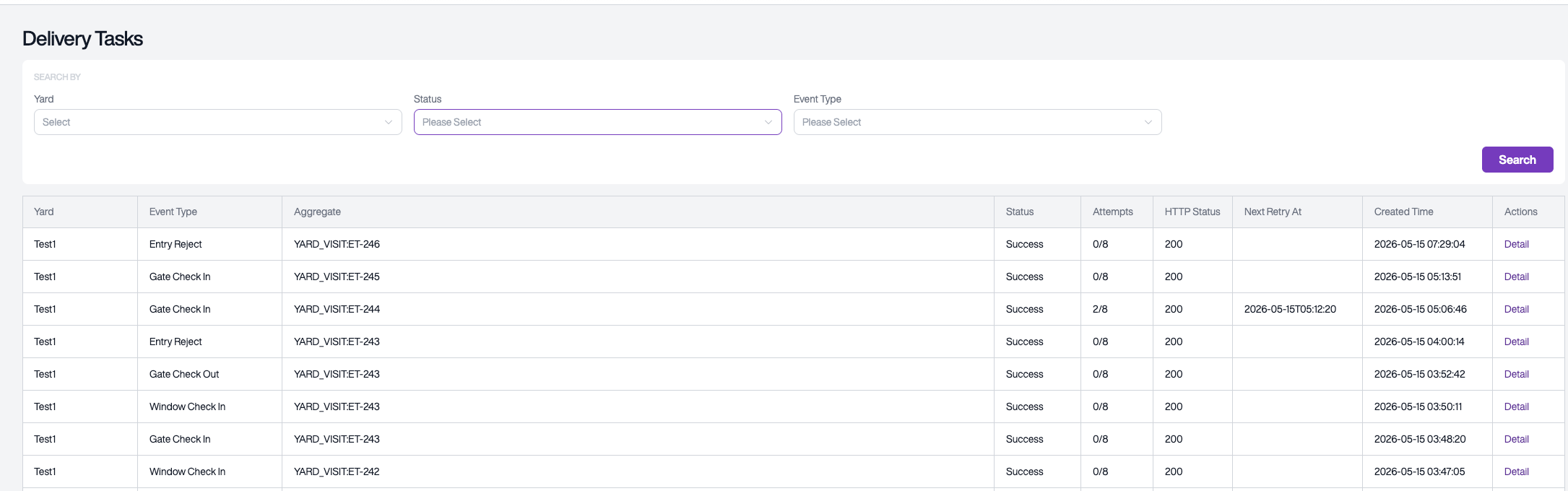
You can filter by yard, delivery status, and event type.
Delivery Status Descriptions
| Status | Description |
|---|---|
| Pending | Awaiting delivery |
| Delivering | Currently being delivered |
| Success | Delivered successfully |
| Retrying | Awaiting retry |
| Failed | Delivery failed |
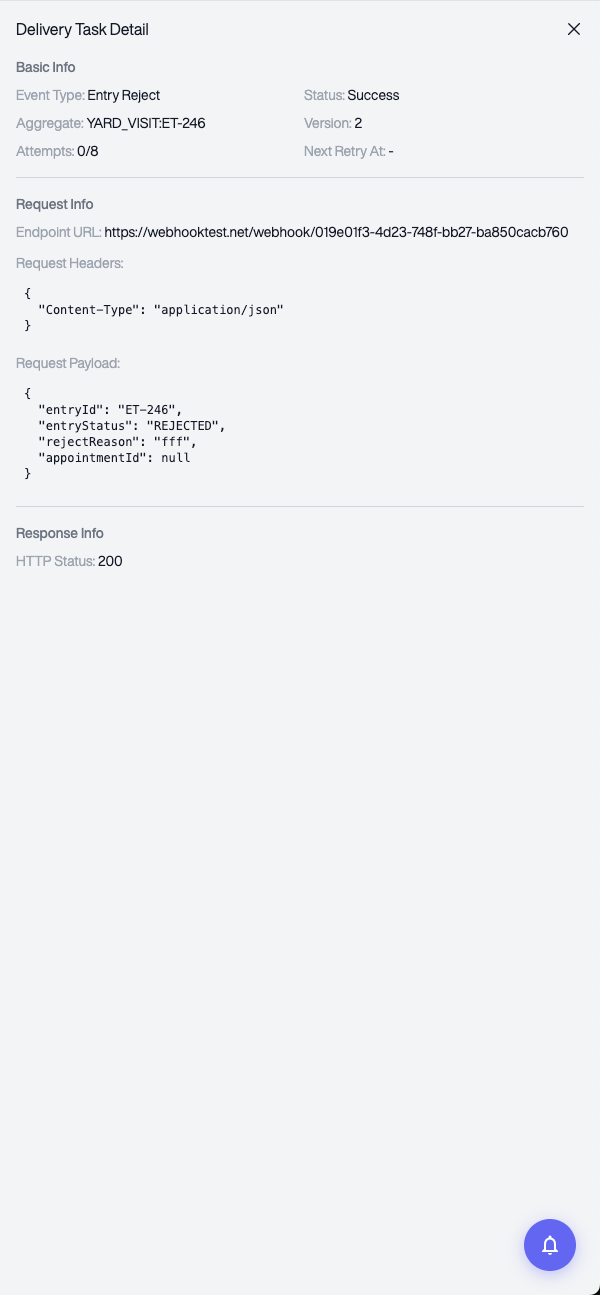
Viewing Delivery Details
Click Detail on a record to view the complete request and response information for troubleshooting.
7. Receiver Development Guidelines
7.1 Basic Requirements
| Requirement | Description |
|---|---|
| Protocol | Must use HTTPS |
| Request Method | Accept HTTP POST |
| Response Requirement | Return a 2xx status code upon successful processing |
| Response Time | Respond within 5 seconds |
7.2 Deduplication
Due to network issues or the retry mechanism, the same event may be delivered multiple times. It is recommended to use the X-YMS-Event-Id header for deduplication to ensure the same event is not processed more than once.
7.3 Sample Code
Java (Spring Boot)
@RestController
@RequestMapping("/webhook")
public class YmsWebhookReceiver {

    @PostMapping("/receive")
    public ResponseEntity<String> handleNotification(
            @RequestHeader("X-YMS-Event-Id") String eventId,
            @RequestHeader("X-Event-Type") String eventType,
            @RequestBody Map<String, Object> payload) {

        // Deduplication check
        if (isAlreadyProcessed(eventId)) {
            return ResponseEntity.ok("OK");
        }

        // Process business logic based on event type
        switch (eventType) {
            case "GATE_CHECK_IN":
                processGateCheckIn(payload);
                break;
            case "GATE_CHECK_OUT":
                processGateCheckOut(payload);
                break;
            case "WINDOW_CHECK_IN":
                processWindowCheckIn(payload);
                break;
            case "ENTRY_REJECT":
                processEntryReject(payload);
                break;
        }

        markAsProcessed(eventId);
        return ResponseEntity.ok("OK");
    }
}
Python (Flask)
from flask import Flask, request, jsonify

app = Flask(__name__)

@app.route('/webhook/receive', methods=['POST'])
def handle_notification():
    event_id = request.headers.get('X-YMS-Event-Id')
    event_type = request.headers.get('X-Event-Type')
    payload = request.get_json()

    # Deduplication check
    if is_already_processed(event_id):
        return jsonify({"message": "OK"}), 200

    # Process based on event type
    if event_type == 'GATE_CHECK_IN':
        process_gate_check_in(payload)
    elif event_type == 'GATE_CHECK_OUT':
        process_gate_check_out(payload)
    elif event_type == 'WINDOW_CHECK_IN':
        process_window_check_in(payload)
    elif event_type == 'ENTRY_REJECT':
        process_entry_reject(payload)

    mark_as_processed(event_id)
    return jsonify({"message": "OK"}), 200
7.4 Recommendations
- Respond quickly: It is recommended to return a success response immediately upon receiving the notification, then process the business logic asynchronously
- Log requests: Save the received headers and notification payload for future troubleshooting
- Authentication: Use Custom Headers to configure authentication credentials (e.g., a Token) and verify the request source on your receiving end
8. Data Isolation
- Each Webhook configuration is associated with a specific yard
- Event notifications are only pushed to Webhook configurations for the corresponding yard
- Disabled configurations will not receive any notifications
- Multiple Webhooks can be configured for the same yard, each operating independently
9. FAQ
Q: My endpoint is not receiving notifications?
Please check the following in order:
- Is the Webhook configuration enabled?
- Have you subscribed to the corresponding event type?
- Is the endpoint publicly accessible?
- Is the endpoint using HTTPS?
- Check the Delivery Tasks page for specific delivery status and error messages
Q: How can I verify that a notification is from YMS?
It is recommended to set a secret authentication Token via Custom Headers when creating the Webhook, and validate that value on your receiving end.
Q: Can the same event be received multiple times?
Yes, duplicate notifications may occur when delivery failures trigger retries. Use X-YMS-Event-Id for deduplication.
Q: Can I configure multiple Webhooks for the same yard?
Yes. Each Webhook can subscribe to different event types. When an event occurs, all matching configurations will receive the notification.
Q: What are the requirements for the endpoint URL?
The endpoint must use HTTPS and be publicly accessible over the internet.
10. Technical Support
If you encounter any issues during integration, please contact the YMS technical support team for assistance.